Keep commercial relationships explicit.
A product account is not necessarily a billing customer. The customer-to-account mapping is maintained deliberately; the daily sync does not guess or overwrite it.
Business operations
Connecting completed work, customer agreements, and billing review.
Client project
Workflow design · Commercial data · Billing review
Billing review workflow
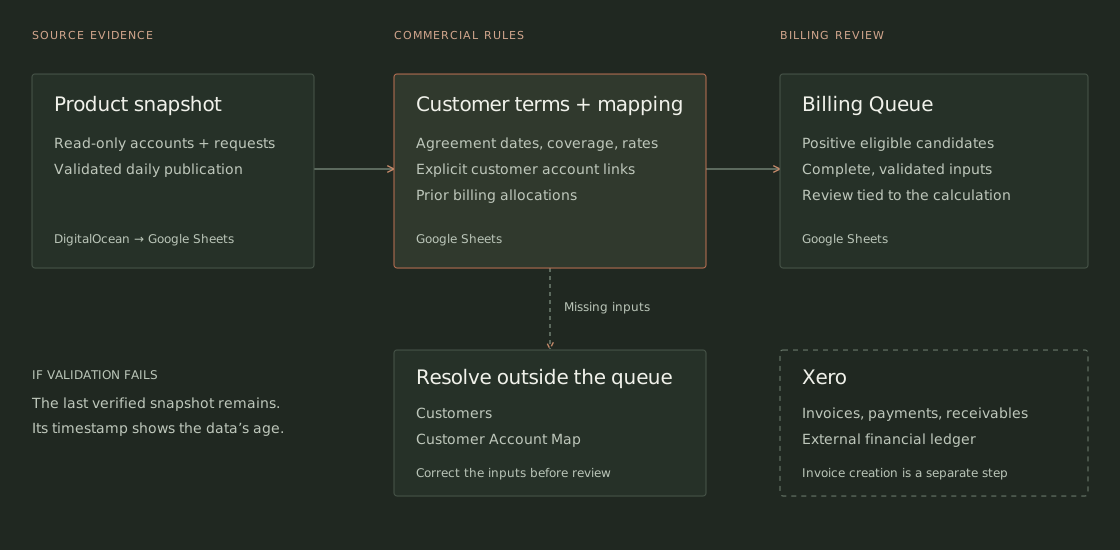
SchematicProduct accounts and report requests arrive in a verified daily snapshot.
Account mappings, agreement periods, included usage, and prior billing establish what is eligible.
Only positive candidates with complete, validated inputs enter the Billing Queue.
Missing billing inputs stay visible on Customers; mapping issues stay visible in Customer Account Map. Those customers stay out of the queue until the inputs are resolved.
The operating problem
A completed report does not tell the whole billing story. The decision also depends on which customer owns the account, what the agreement includes, and which reports have already been billed. Outermost is helping build a workflow that brings those inputs together for a lender-reporting business.
The workbook connects product activity with customer terms and explicit account mappings. It calculates eligible usage after included coverage and prior billing allocations, then presents positive invoice candidates for review.
The team can inspect the basis for a candidate, resolve missing inputs where they are maintained, and record a review against the calculation they actually checked.
The review follows the commercial relationship, the work performed, and the evidence behind the amount.
Explicit mappings connect one commercial customer to its product accounts.
Completion, period, included usage, and prior allocations determine eligible usage.
Incomplete terms or mappings need correction before a customer can enter the queue.
A changed calculation requires a new review.
Systems and responsibilities
DigitalOcean publishes a validated daily snapshot from a read-only product connection. Google Sheets holds commercial terms, mappings, calculations, and reviews. Xero retains the financial records.
Read-only access supplies product accounts and report requests, including completion state. The source product is not changed.
Accounts and requests are extracted together, validated, and published in one Sheets update with sync metadata. A failed validation leaves the previous verified snapshot in place.
Customers holds current agreement terms. Customer Account Map records the explicit relationship between commercial customers and product accounts.
Formulas calculate positive eligible candidates using completed usage, current terms, and prior allocations. Reviews are tied to calculation signatures, so changed inputs require another review.
Invoices, payments, and accounts receivable remain in Xero. Invoice creation and Xero write access are outside this workflow.
Operating decisions
A product account is not necessarily a billing customer. The customer-to-account mapping is maintained deliberately; the daily sync does not guess or overwrite it.
The billing queue is for positive amounts ready for review. Missing terms, coverage, currency, or mappings remain visible in the input tabs, where the team can resolve them.
An approval refers to a calculation signature. Changes to the supporting inputs require review again, so an earlier approval cannot silently cover a different result.
Validation happens before the snapshot is published. A failed check leaves the workbook unchanged, and the last successful sync time makes the age of the source data visible.
What would you like to build or improve?
hello@outermost.us